New in Mellel 6.6
Citation Inspector
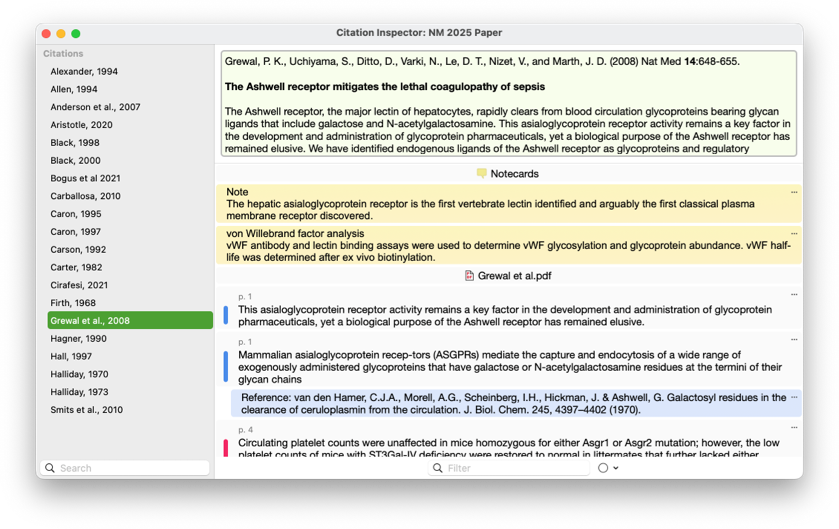
The Citation Inspector window provides a detailed view of references used in your document all within Mellel. For each citation in the document, the inspector shows you reference details such as title, authors, abstract, and more, and lists all notecards, attached PDFs and their annotations, and other attachments. You can use this information in your document by copying, dragging and dropping, inserting as a footnote/endnote, or creating deep links. The notecard and annotation lists also features a handy filter that allows you to zero in on specific items by filtering for text or highlight color.
Note: Citation Inspector requires Bookends 15.2.4 or later
Auto Expander
Auto Expander is a feature that saves you time by letting you insert text using a shortcut. To use Auto Expander, define the text want to type, i.e., the shortcut, and the text you want to replace it with. You can use Auto Expander to enter long words or phrases, special characters that are not available via the keyboard, ensure that text that is prone to typos is entered correctly, and more.

Template Chooser
The template chooser now features a cleaner design and the window can be resized freely (which is remembered for the next time). A context menu allows you to set the default template, and the "Don't show" checkbox allows you to skip this window when creating a new document, selecting the default template automatically.

New Licensing System
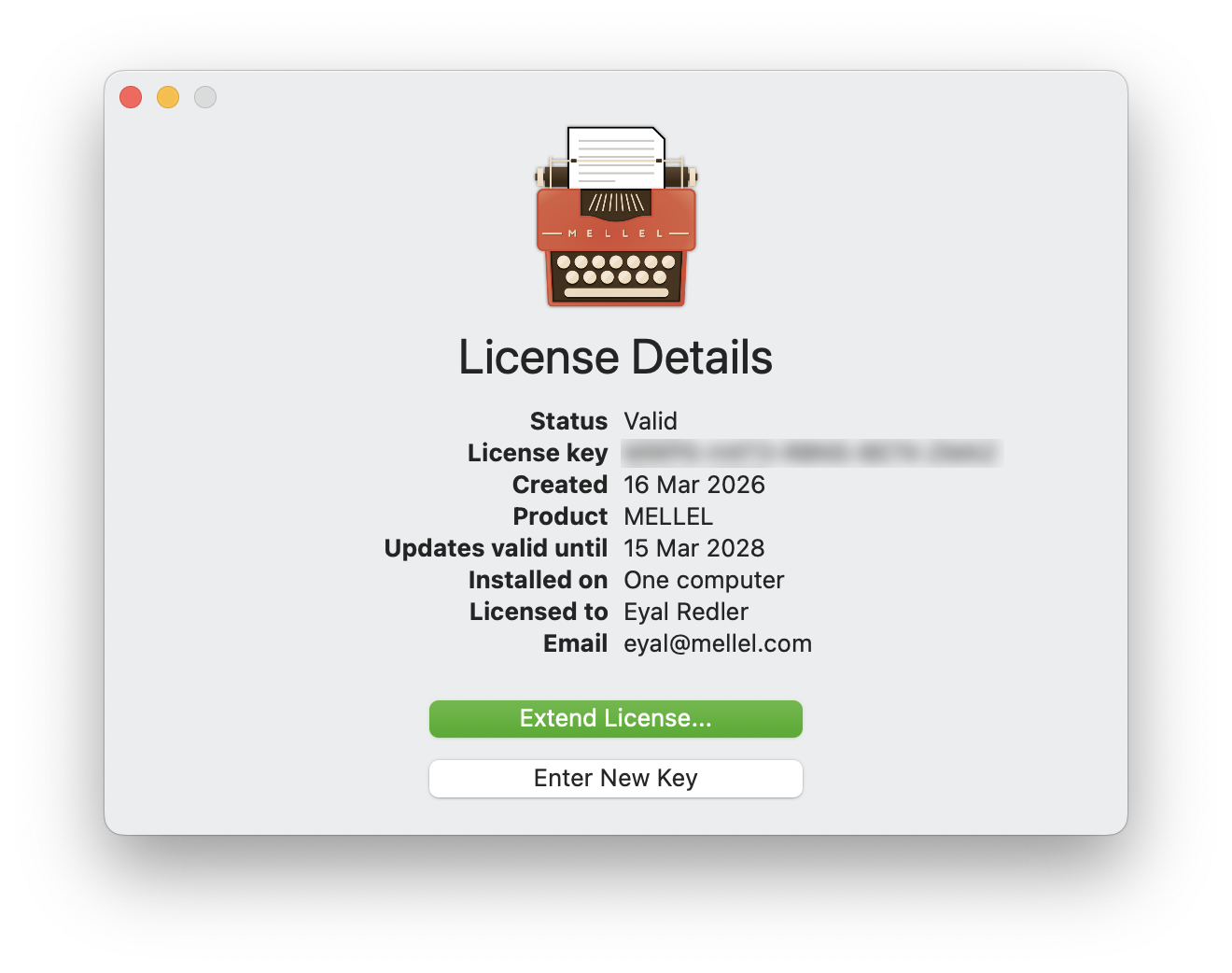
Version 6.6.5 features a rewritten licensing and purchase system. The new system is modern, based on a license stored on the server and cached locally. This scheme simplifies setting up and purchasing Mellel and significantly improves the experience of installing and maintaining Mellel on multiple computers.
The new licensing system allows you to activate Mellel without entering a license key, and propagates changes in the license to all of your computers automatically.
Purchases are now done using your default browser and a new license details window gives you a clear picture of the license status and details.
Of-course, older license (that is, legacy licenses) are recognized and converted automatically to the new system.
Free Mode
When the free trial period is over or if you have an old paid license and you still haven't decided to upgrade, you can continue to use Mellel in a limited way for free. The free mode allows you to open, view, print, and export any Mellel document and edit short documents.
For new users, the free mode lets you try Mellel out beyond the free trial period. For owners of older licenses the free mode lets you keep Mellel current and maintain access to Mellel documents you've created in the past.
Release Notes
Mellel 6.6.7 (April 29th 2026)
- Fixed a bug that caused Mellel to quit unexpectedly (not crash) when running for a long time on an offline computer.
- Added an option to enter legacy license keys (and user name) in the "Enter New Key" window.
- Improved sign-in window email field placeholder text.
- Fixes an issue that caused bad layout with fonts that were used as substitute fonts when used explicitly in the same session.
- Updated Czech localization.
- Citation Inspector - fixed an issue that caused an attachment icon to be clipped with very long attachment names.
- Fixed capitalization and sorting errors in the tester credits section of the "About" window.
Mellel 6.6.5 (March 23rd 2026)
- New Licensing System
- Modern License - License is stored on the server and cached locally.
- Automatic Propagation - Purchases and upgrades done on one computer are recognized automatically on all computers.
- Email Sign-In - License is activated by signing in using your email. No need to enter an activation key.
- License Details Window - License details, status, and management options are clearly indicated in the new license details window.
- Legacy License Support - Legacy licenses are converted automatically, preserving all of your entitlements.
- Web Based Purchase - Purchase of new licenses and upgrades is done via your default web browser for a more reliable and reassuring operation.
- Extendable License - Extend the license at any time. Lets you take advantage of sales and special offers before the end of the free updates period.
- Free Mode - When the free trial ends or if your purchased license doesn't cover this version, Mellel continues to operate, allowing you to open, view, print and export any Mellel document and edit short (up to 5 pages) documents.
Mellel 6.6.1 (February 27th 2026)
- Fixed a bug that caused Mellel to crash when editing auto-titles in the outline.
- Fixed some spelling errors in the German localization.
Mellel 6.6 (January 10th 2026)
-
Citation Inspector - Provides a detailed view of references used in your document from within Mellel. Including the all reference details, attachements, notecards and annotations. (Requires Bookends 15.2.4 or later)
- Citation List - A list of all citations used in the document. A filter field lets you find citations quickly.
- Summary - Displays the full reference details including title, authors, year, and abstract.
- Notecards - All notecards associated with the reference are listed.
- Attachments - All attached documents are listed and can be accessed.
- PDF Annotations - Annotations to PDF attachements are listed and can be accessed directly.
- Text Filter - Locate annotations and notecards by text.
- Highlight Filter - Location annotations by color.
- Drag & Drop - You can drag and drop the summery, notecards and annotations into your document.
- Insert as Note - This command allows you to insert a notecard or annotation into your your document as a footnote or endnote.
-
Auto Expander - Lets you define shortcuts for frequently used or hard to enter text.
- Snippets - Define the text you want to enter, a shortcut and Mellel will automatically enter the text whenever you type the shortcut.
- Expansion Sound - Choose which sound to play, if any, when a snippet is expanded.
- Enable/Disable - Switch Auto Expander on or off globally via the switch or edit menu item.
- Template Chooser - The revised template choose window looks better and provides more functionality.
- Better Design - It looks better.
- Resize - The window can be resized and the size is remembered for the next time.
- Split View - The window features a real split view so you can set it up as you like.
- Contextual Menu - Right-clicking template items allows you the following options:
- Open Template - Open a new document with the selected template.
- Make Default - Make the selected template the default template.
- Delete Template - (For custom templates) Remove the template from the window.
- "Don't Show Again" - Check this to skip the window when creating a new document and use the default template.
- Bug Fixes
- Index - Fixed an issue that caused choosing Index > New Record & Mark in the contextual menu to create an index record but not mark.
- Memory - Revamped the piping and fixed many leaks.
- DOCX Import - Improved handling of bullet lists.
- Bibliography Palette - When listing citations alphabetically, citations that differ only in special handling command or cited pages are listed only once.
- Settings - Fixed an issue that caused some toolbar item labels to overflow the available toolbar width in the german localization.